✓ Free 🤖 Android ✦ New
USB테더링
QuickTether
v2.0
원터치 USB 테더링 켜기
One-tap USB Tethering Toggle

USB 케이블을 꽂으면 즉시 연결 상태를 감지하고, 버튼 한 번으로 테더링 설정 화면을 바로 엽니다. 세션·일별·월별 데이터 사용량 통계와 한도 초과 알림까지 제공합니다.

Detects USB connection instantly and opens tethering settings with one tap. Tracks session, daily, and monthly data usage — with limit alerts when you go over.

🔌 USB 연결 자동 감지Auto USB detection 원터치 테더링One-tap tethering 📊 데이터 사용량 통계Data usage stats 🔔 한도 초과 알림Limit alerts 🪟 홈 화면 위젯Home widget
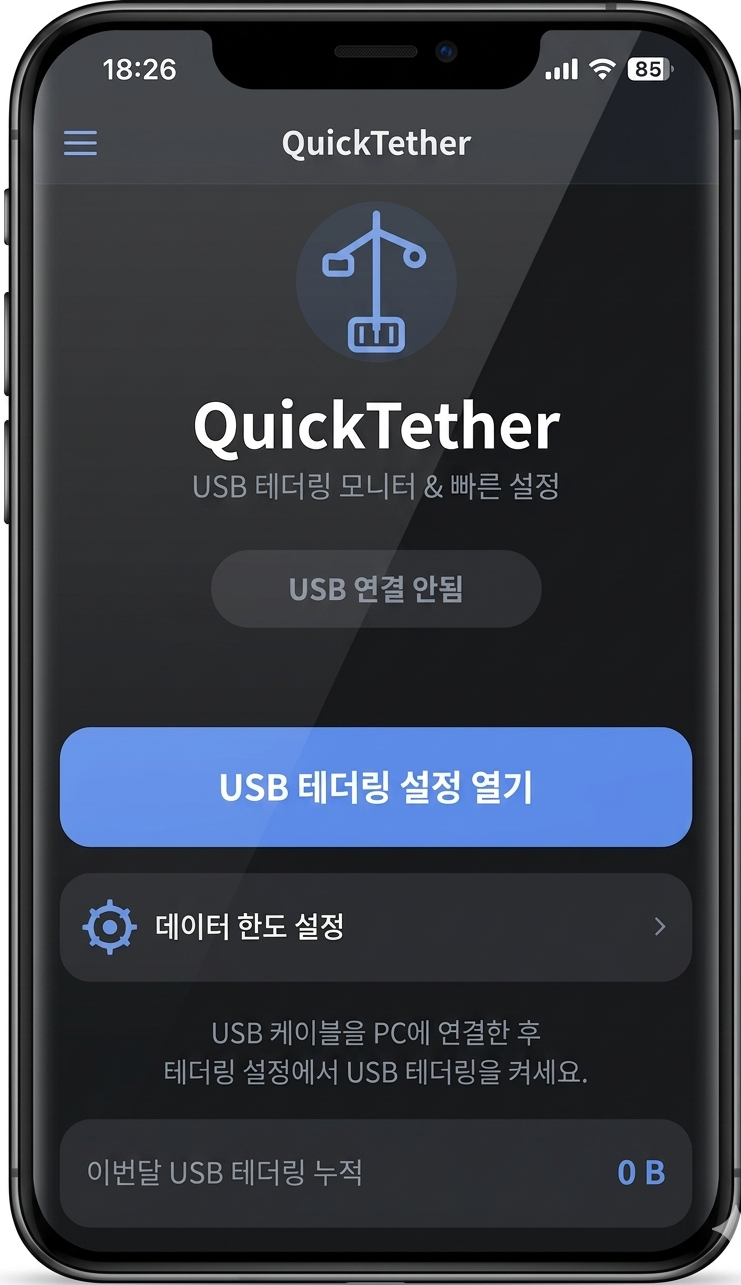
USB테더링 스크린샷
꽂으면 켜진다 🔌
Plug in, one tap, done 🔌
🔌
USB 연결 자동 감지
Auto USB Detection

USB 케이블을 연결하는 순간 앱이 즉시 감지하고 연결 상태를 화면에 표시합니다. 충전 전용 케이블인 경우도 별도로 안내합니다.

The app instantly detects when you plug in a USB cable and shows the connection status. Charge-only cables are identified separately.

원터치 테더링 설정
One-Tap Tethering

버튼 하나로 안드로이드 USB 테더링 설정 화면을 바로 엽니다. 설정 앱을 헤매지 않아도 됩니다.

One button opens the Android USB tethering settings screen directly. No more digging through the Settings app.

📊
데이터 사용량 통계
Data Usage Stats

이번 연결 세션, 오늘, 이번 달 USB 테더링으로 사용한 데이터를 한눈에 확인할 수 있습니다.

View data used over the current session, today, and this month via USB tethering — all in one screen.

🔔
한도 초과 알림
Data Limit Alerts

일일·월간 데이터 사용 한도를 GB 단위로 설정하고, 초과 시 알림과 함께 테더링 설정 화면이 자동으로 열립니다.

Set daily and monthly data limits in GB. When exceeded, a notification fires and tethering settings open automatically.

🪟
홈 화면 위젯
Home Screen Widget

홈 화면에 위젯을 추가하면 앱을 열지 않고도 원터치로 테더링 설정을 바로 열 수 있습니다.

Add the widget to your home screen to open tethering settings with one tap — no need to launch the app.

📡
실시간 상태 표시
Live Status Display

USB 미연결 / 연결됨(테더링 가능) / 테더링 중 상태를 색상과 아이콘으로 실시간 구분해 표시합니다.

Color-coded live status: disconnected, connected (tethering available), or actively tethering — always visible at a glance.

Android APK 설치 🤖
Install on Android 🤖
1
APK 다운로드
Download APK

위 다운로드 버튼을 눌러 GitHub Releases 페이지에서 최신 APK 파일을 받으세요.

Tap the download button above to get the latest APK from the GitHub Releases page.

2
알 수 없는 앱 설치 허용
Allow Unknown Sources

파일 관리자로 APK를 실행하면 「이 출처 허용」 설정 화면으로 이동할 수 있습니다. 해당 앱(파일 관리자 또는 브라우저)에 대해 허용으로 변경해 주세요.

When you open the APK, Android may ask you to enable "Install unknown apps" for your file manager or browser. Enable it for that app only.

3
설치 후 실행
Install & Launch

설치 완료 후 앱을 실행하세요. USB 케이블을 PC에 연결하면 앱이 자동으로 연결 상태를 감지합니다.

After installing, launch the app. Connect your USB cable to a PC and the app will automatically detect the connection.

4
알림 권한 허용 (선택)
Allow Notification Permission (Optional)

데이터 한도 초과 알림을 받으려면 알림 권한을 허용해 주세요. 알림이 필요 없다면 건너뛰어도 됩니다.

Allow notification permission if you want data limit alerts. You can skip this if you don't need notifications.

💡
Google Play 미등록 앱으로, APK를 직접 설치하는 방식입니다. GitHub Releases에서 직접 배포하는 무료 앱입니다.
This app is not on the Play Store — distributed as a direct APK. It's a free app distributed directly via GitHub Releases.
Workez365의 앱들 🌸
Other apps by Workez365 🌸
🌙 오늘도 밤늦게 코딩 중coding late again tonight

타닥타닥, 혼자 만들어요 🐱

Tap tap tap, built by one cat 🐱

밤마다 홀로 타닥타닥, 고양이처럼 만들고 있어요. 커피 한 잔만큼의 응원이 다음 버전을 만드는 연료가 됩니다. ☕

Made alone, late at night, one key at a time. A coffee's worth of support fuels the next version. ☕

커피 한 잔 사줄게요Buy me a coffee
buymeacoffee · toss · 완전 선택사항이에요 🐾
buymeacoffee · toss · totally optional 🐾
toss
Toss QR Code

앱이 마음에 드셨나요?
토스로 커피 한 잔 후원해주세요 ☕
밤새 개발하는데 큰 힘이 됩니다.

Enjoying the app?
Support via Toss ☕
It really helps me keep building.

📱
APK 설치 안내
APK Install Guide
Android에 APK를 설치하는 방법 안내입니다.
How to install an APK on Android.
다운로드 완료Download complete
📦
이 유형의 파일은 기기에 손상을 줄 수 있습니다.
APK 파일을 계속 받으시겠어요?
This type of file can harm your device.
Keep the APK file anyway?
취소
Discard
계속Keep
1
위 팝업에서 「계속」을 눌러 APK를 다운받으세요.
Tap "Keep" in the prompt above to download the APK.
2
다운로드 완료 후 파일 관리자에서 APK를 탭 → 「이 출처 허용」 선택 후 설치하세요.
After download, tap the APK in your file manager → select "Allow from this source" and install.
3
설치 완료 후 앱을 실행하고 USB 케이블을 PC에 연결하세요.
Launch the app after installing and connect your USB cable to a PC.