✓ Free 🖥 Windows ✦ New
TickTask
v2.0.0
무설치 TODO 리스트 관리
Portable TODO List Manager

압축 파일을 풀면 바로 실행되는 무설치 TODO 관리 앱입니다. 할일 등록부터 댓글·서브댓글, 색상 태그, 알람·마감일, HTML 내보내기까지 — 복잡함 없이 꼭 필요한 기능만 담았습니다.

Just unzip and run — no installer needed. Manage tasks with sub-comments, color tags, alarms, deadlines, and HTML export. Everything you need, nothing you don't.

📝 할일 관리Task list 💬 댓글·서브댓글Comments 🏷 색상 태그Color tags 알람·마감일Alarms & deadlines 🌐 HTML 내보내기HTML export 📸 화면 캡쳐Screenshot 💾 자동 저장Auto-save 🚀 무설치Portable
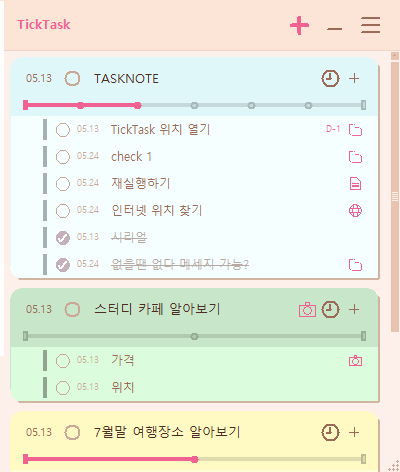
TickTask Screenshot
딱 필요한 것만 ✨
Just what you need ✨
📝
할일 관리
Task Management

할일 추가·완료·삭제를 빠르게. 항목별 진행 상태를 한눈에 파악할 수 있습니다.

Add, complete, and delete tasks instantly. See your progress at a glance.

💬
댓글 · 서브댓글
Comments & Sub-comments

각 할일에 메모와 서브댓글을 달아 세부 내용을 체계적으로 정리할 수 있습니다.

Attach notes and nested comments to any task to keep details organized.

🏷
색상 태그
Color Tags

중요도·카테고리별로 색상 태그를 붙여 우선순위를 한눈에 구분합니다.

Color-code tasks by priority or category for instant visual sorting.

알람 · 마감일
Alarms & Deadlines

마감일을 설정하고 알람을 받아 중요한 할일을 놓치지 마세요.

Set deadlines and get alarm reminders so nothing slips through.

🌐
HTML 내보내기
HTML Export

할일 목록을 HTML 파일로 내보내 공유하거나 보관할 수 있습니다.

Export your task list as a formatted HTML file to share or archive.

🚀
무설치 · 자동 저장
Portable & Auto-save

설치 없이 어디서든 바로 실행. 입력 내용은 자동으로 저장됩니다.

Run anywhere without installing. All changes are saved automatically.

30초면 준비 완료 🖥
Ready in 30 seconds 🖥
1
다운로드
Download

위 다운로드 버튼을 클릭해 TickTask_v2.0.0.exe 파일을 받으세요.

Click the download button above to get TickTask_v2.0.0.exe.

2
Windows 보안 경고 처리
Handle Windows Security Warning

파란 SmartScreen 경고창이 뜨면 「추가 정보」를 클릭한 뒤 「실행」을 눌러주세요. 개인 코드 서명 인증서가 없는 소규모 무료 앱이라 표시되는 안내입니다. 악성 코드가 없음을 보장합니다 🙏

When the blue SmartScreen warning appears, click "More info" then "Run anyway". This appears because the app has no paid code-signing certificate. It's completely safe 🙏

Windows의 PC 보호
Windows protected your PC

Microsoft Defender SmartScreen에서 인식할 수 없는 앱의 시작을 차단했습니다. 이 앱을 실행하면 PC가 위험에 노출될 수 있습니다.

Microsoft Defender SmartScreen prevented an unrecognized app from starting. Running this app might put your PC at risk.

추가 정보
More info
3
바로 실행
Launch

설치 없이 바로 실행됩니다. 이후에는 더블클릭만으로 시작할 수 있어요.

No installation needed — just double-click to launch anytime.

Workez365의 앱들 🌸
Other apps by Workez365 🌸
🌙 오늘도 밤늦게 코딩 중coding late again tonight

타닥타닥, 혼자 만들어요 🐱

Tap tap tap, built by one cat 🐱

밤마다 홀로 타닥타닥, 고양이처럼 만들고 있어요. 커피 한 잔만큼의 응원이 다음 버전을 만드는 연료가 됩니다. ☕

Made alone, late at night, one key at a time. A coffee's worth of support fuels the next version. ☕

커피 한 잔 사줄게요Buy me a coffee
buymeacoffee · toss · 완전 선택사항이에요 🐾
buymeacoffee · toss · totally optional 🐾
toss
Toss QR Code

앱이 마음에 드셨나요?
토스로 커피 한 잔 후원해주세요 ☕
밤새 개발하는데 큰 힘이 됩니다.

Enjoying the app?
Support via Toss ☕
It really helps me keep building.

🛡
윈도우 보안 경고 안내
Windows Security Warning
다운로드 후 아래 절차를 따라주세요 — 바이러스가 아니에요 😊
Follow these steps after download — it's safe, not a virus 😊
Windows의 PC 보호
Windows protected your PC

Microsoft Defender SmartScreen에서 인식할 수 없는 앱의 시작을 차단했습니다. 이 앱을 실행하면 PC가 위험에 노출될 수 있습니다.

Microsoft Defender SmartScreen prevented an unrecognized app from starting. Running this app might put your PC at risk.

추가 정보
More info
1
「추가 정보」를 클릭하세요.
Click "More info".
2
나타나는 「실행」 버튼을 클릭하면 바로 실행됩니다.
Click "Run anyway" to launch.
3
소규모 무료 앱이라 표시되는 안내예요. 악성 코드 없음을 보장합니다 🙏
This shows because the app has no paid certificate. Completely safe 🙏